
Easy Integration and Sandbox Environment
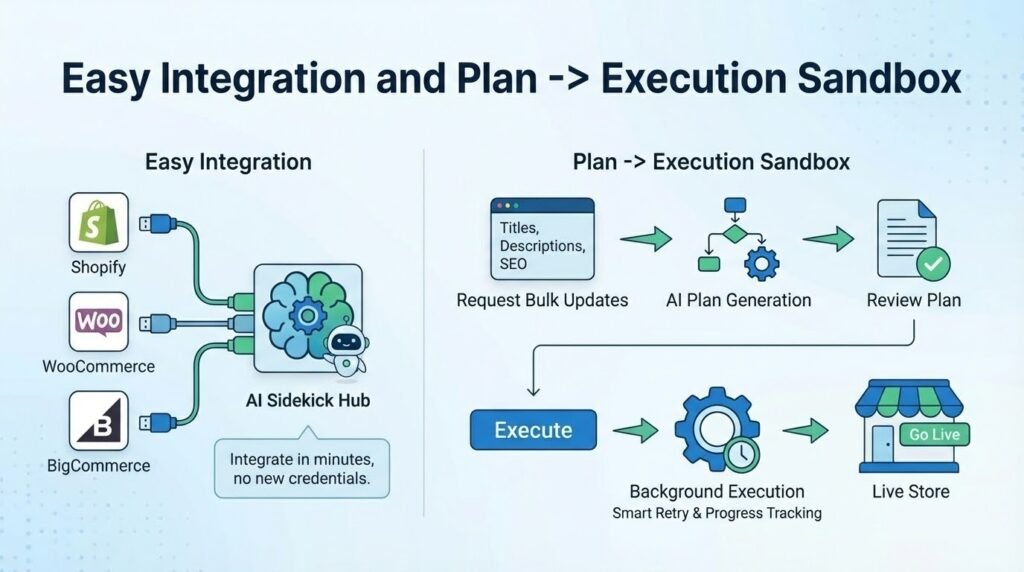
Wade integrates with your existing store in minutes—no new credentials needed. Test safely in our sandbox environment, then go live when you’re ready. Connect your platform, sync your products, and start managing your store with AI-powered assistance today. Wade uses the same credentials as your chat widget, so there’s nothing extra to configure. Just open Wade in your admin dashboard and start asking questions or creating plans.
Plan Generation: Agentic Workflow
Wade creates comprehensive plans for bulk product updates using an intelligent agentic workflow. Click the Plan button, then ask Wade to “improve all product titles” or “optimize SEO fields for my catalog.” Wade analyzes your products, asks clarifying questions if needed, and generates a detailed plan with before-and-after comparisons. Review the plan, make any adjustments, then execute it with one click. Wade handles everything in the background—batching products, generating improvements, and updating your store automatically. You get real-time progress updates as each product is processed, so you always know what’s happening.
How Plan Generation Works
When you ask Wade to create a plan, he enters Plan Mode automatically. He analyzes your products, understands what you want to improve (titles, descriptions, SEO fields, or all of the above), and creates a structured plan. The plan shows current values and proposed improvements side-by-side, so you can review everything before execution. Once you approve, Wade executes the plan autonomously—processing products in batches, handling errors gracefully, and updating your store systematically. You can pause, resume, or cancel execution at any time.
Research Memos: Market Intelligence
Wade performs web research to help you understand your market better. Ask Wade to “research how competitors price similar products” or “analyze market trends for my category.” Wade searches the web, gathers competitive insights, pricing strategies, and market positioning data, then creates a comprehensive research memo. The memo includes a summary, key findings, competitive benchmarks, and actionable recommendations. All research is saved as a memo you can reference later, share with your team, or use to inform your business decisions.
Research Memo Features
Research memos are automatically generated from web search results. Wade analyzes competitor pricing, product positioning, market trends, and industry insights, then compiles everything into a structured memo. Memos include competitive benchmarks comparing your products to similar items on other sites, pricing strategies used by successful competitors, and actionable recommendations based on market data. You can generate memos from orders (sales analysis) or your entire catalog (catalog analysis), giving you deep insights into your business performance and market position.
Catalog Enrichment and SEO Optimization
Wade enriches your product catalog with AI-generated descriptions, attributes, and SEO-optimized metadata. He uses web research to understand market standards and competitor strategies, then generates content that matches industry best practices. Review every suggestion with confidence scores before approval—validation safeguards ensure accuracy. Bulk-update hundreds of products with search-engine-friendly content while maintaining complete control over publication. Wade distinguishes between product content (what customers see) and SEO fields (what search engines see), so you can optimize both separately.
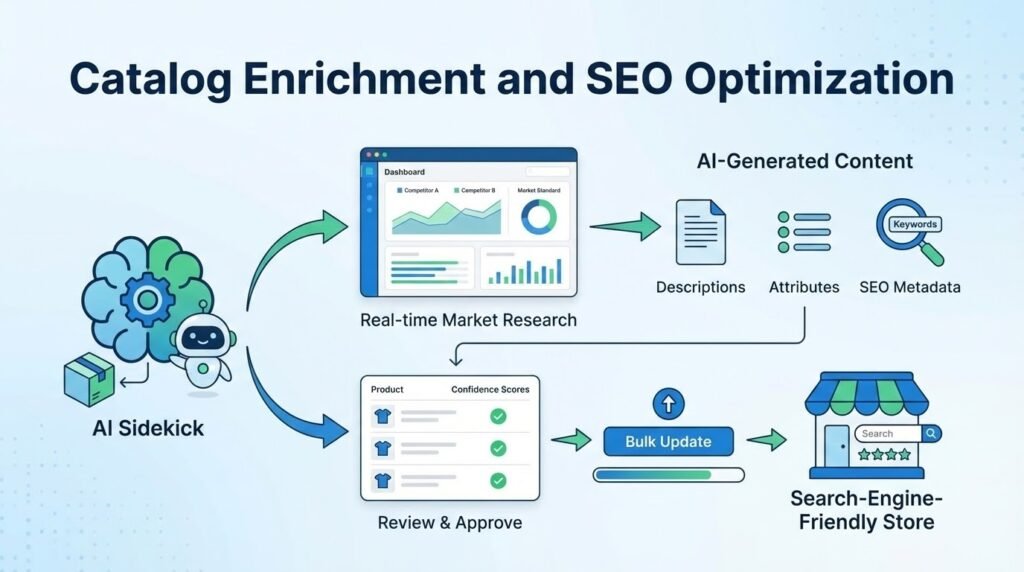
SEO Field Optimization
Wade optimizes five different SEO fields: meta titles (50-60 characters for search results), meta descriptions (150-160 characters for search snippets), focus keywords (primary keywords for SEO), Open Graph titles (for social media sharing), and Open Graph descriptions (for social media previews). When you ask Wade to improve SEO, he clarifies which fields you want to optimize, then generates improvements based on search engine best practices and your product content. All SEO improvements are reviewed before execution, so you maintain control over how your products appear in search results.
Product Content Enhancement
Wade improves product titles, descriptions, and short descriptions to make them more compelling and informative. He uses market research to understand how competitors describe similar products, then generates content that highlights your products’ unique features and benefits. Wade can work on single products (using the “Ask Wade” button on product pages) or create bulk plans for your entire catalog. All content improvements are reviewed before publication, ensuring quality and accuracy.
Two Modes: Ask and Plan
Ask Mode (Default)
In Ask Mode, Wade answers questions, analyzes your store, and provides strategic recommendations. Ask Wade about your best-selling products, sales trends, catalog composition, or any aspect of your business. Wade uses your actual store data to give personalized advice. He can also improve individual products using the “Ask Wade” button on product pages—just click the button and tell Wade what you want to improve. Ask Mode is perfect for quick questions, single product improvements, and strategic guidance.
Plan Mode
In Plan Mode, Wade creates comprehensive plans for bulk operations. Click the Plan button at the top of the chat, then ask Wade to create a plan for improving multiple products. Wade analyzes your entire catalog, generates improvements for all matching products, and creates a structured plan you can review before execution. Plan Mode is essential for bulk updates—updating hundreds of products at once, optimizing SEO across your catalog, or improving product descriptions systematically. Plans are saved as posts you can edit, review, and execute when ready.
Market Research via Web Search
Wade uses web search to gather market intelligence and competitive insights. Ask Wade to research competitor pricing, market trends, or industry best practices, and he searches the web to find relevant information. Wade analyzes search results, extracts key insights, and presents them in easy-to-understand research memos. This helps you make informed decisions about pricing, product positioning, and marketing strategies based on real market data, not just guesswork.
Competitive Benchmarking
Wade compares your products to competitors’ offerings, analyzing pricing strategies, product positioning, and market trends. Research memos include competitive benchmarks showing how your products stack up against similar items on other sites. This helps you understand your market position, identify opportunities for improvement, and make data-driven decisions about pricing and marketing.
Market Trend Analysis
Wade identifies market trends and opportunities by analyzing web search results. He looks for patterns in pricing, product features, marketing strategies, and customer preferences, then presents actionable insights in research memos. This helps you stay ahead of market changes and adapt your strategy based on current trends.
Strategic Analysis and Recommendations
Wade provides expert ecommerce guidance based on your actual store data. He analyzes your products, orders, categories, and sales patterns to identify growth opportunities and improvement areas. Wade gives you strategic recommendations tailored to your specific store, not generic advice. He helps you understand what’s working, what needs improvement, and how to optimize your catalog for better performance.
Store Analytics
Wade analyzes your store’s performance, identifying best-selling products, underperforming categories, pricing patterns, and sales trends. He uses this data to provide personalized recommendations for improving your catalog, optimizing pricing, and increasing sales. All analysis is based on your actual store data, ensuring recommendations are relevant and actionable.
Catalog Optimization
Wade helps you optimize your product catalog by identifying missing information, incomplete descriptions, and opportunities for improvement. He suggests product attributes, categories, tags, and content enhancements that can help your products perform better. Wade’s recommendations are based on ecommerce best practices and your specific product data, making them practical and effective.
Platform Sync: Sandbox Environment
Wade works in a safe sandbox environment where you can test changes before they go live on your platform. When Wade generates a plan and you execute it, all changes are made to your sandbox store first—not your live platform. This lets you review every change, see how products will look, and verify everything is correct before syncing back to your actual platform (Shopify, Odoo, BigCommerce, etc.).
How Platform Sync Works
After Wade executes a plan in your sandbox, you’ll see a “Platform Sync” button. Click it to review all the changes Wade made—you’ll see a side-by-side comparison showing what changed and what stayed the same. Review each product, approve or reject changes, then sync everything back to your live platform with one click. This two-stage process (sandbox first, then platform sync) ensures you never accidentally publish changes you don’t want. You’re always in control, and you can test as much as you want in the sandbox without affecting your live store.
Safe Testing Environment
The sandbox environment is completely separate from your live platform. You can test bulk updates, SEO changes, product descriptions, and any other modifications without risk. Wade makes all changes in the sandbox first, so you can see exactly how products will look, verify SEO fields are correct, and ensure everything matches your brand before syncing. If something doesn’t look right, you can adjust it in the sandbox before syncing, or simply don’t sync that product. Your live platform stays untouched until you’re ready.
AI Evidence: See How Wade Thinks
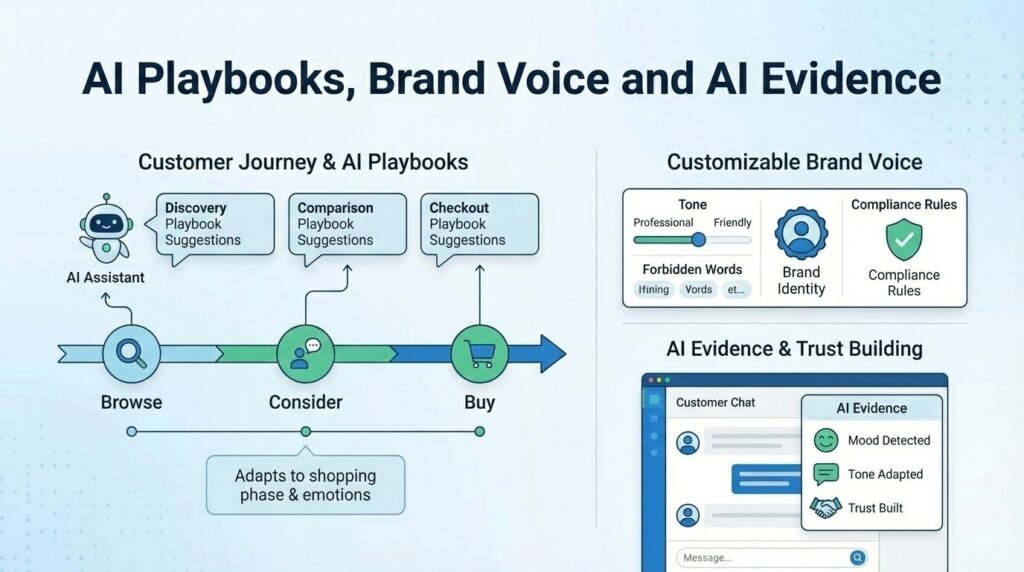
Wade shows you exactly what he’s doing as he works, so you understand his thinking process. When Wade generates a plan or executes updates, you’ll see messages like “Analyzing your products…” and “Generating improvements…” that explain what he’s working on. You can see which tools Wade is using, what data he’s analyzing, and how he’s making decisions—all in real-time as he works.
Plan Generation Transparency
When Wade creates a plan, he shows you his thinking process step-by-step. You’ll see messages like “I’m analyzing 150 products to find opportunities for improvement” and “I’m generating SEO-optimized titles based on search engine best practices.” Wade also shows you which functions he’s calling (like “get_products” to fetch your catalog or “suggest_product_field_content” to generate improvements), so you understand exactly how he’s working. This transparency helps you trust Wade’s recommendations and understand why he’s suggesting specific changes.
Tool Call Visibility
Wade uses various tools to help you—fetching product data, generating content, performing web research, and more. With AI Evidence enabled, you can see every tool Wade uses, what parameters he’s passing, and what results he gets back. This helps you understand Wade’s workflow and gives you confidence that he’s using the right data and making informed decisions. You can see Wade’s tool calls in real-time as he works, or review them later in your conversation history.
Configurable Display
You control how much AI Evidence you see. You can choose to see all thinking messages, only important ones, or hide them completely. Thinking messages can be set to fade after a few seconds, stay visible forever, or never appear at all. This lets you customize Wade’s transparency to match your preferences—whether you want full visibility into his process or prefer a cleaner interface with less detail.
Universal Platform Support
Wade works with any ecommerce platform—WooCommerce, Shopify, BigCommerce, Odoo, WiX, Square, and custom sites. He adapts to your platform’s specific features and terminology, so you get platform-appropriate advice and recommendations. Whether you’re using a popular platform or a custom solution, Wade understands your setup and provides relevant guidance.

Intelligence-Focused Design
Wade is designed for intelligence and strategic thinking, not sentiment. While Claudia focuses on understanding customer emotions and providing empathetic responses, Wade focuses on data analysis, market research, and strategic recommendations. He helps you make informed business decisions by providing deep insights, competitive analysis, and actionable plans based on real data and market intelligence.